
In certain situations, system administrators or Information Technology(IT) officers will necessary to restrict the access to removable devices for every PCs in organisations mainly due to security. By restricting the USB ports we can avoid the viruses not spread from the USB thumb drives. Most important, we also can make sure that unauthorized contents remain safe in your computer. This post will show you how to deny read and write access to all removable external hard disk drives or USB devices that are connected to your computer for all users.
Steps :
1. Go to Run.
2. Type > gpedit.msc and press enter.
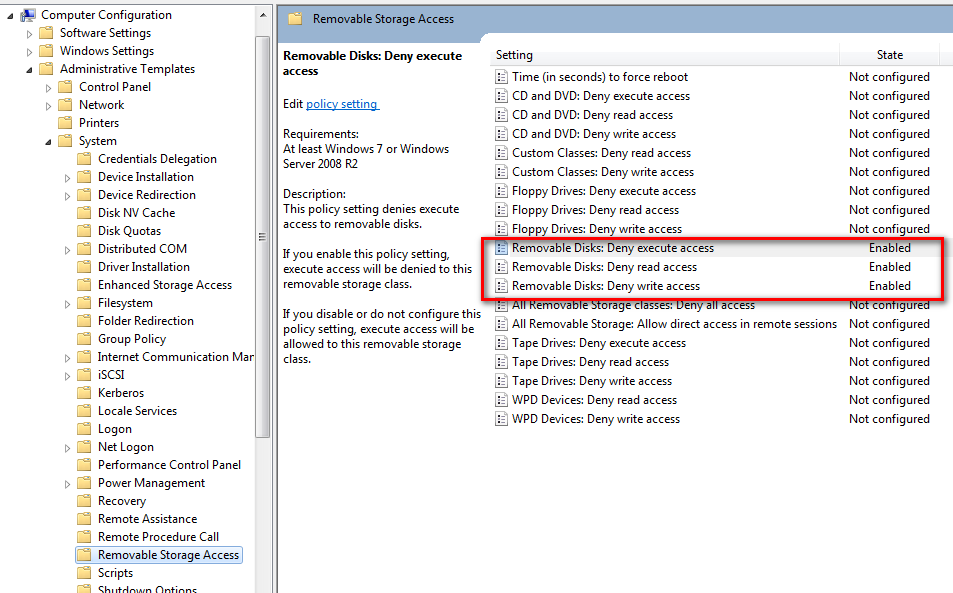
3. Under Computer Configuration > Policies > Administrative Templates > System > Removable Storage Access
Change the state to Enabled for for Removal Disks as below :
Removable Disks: Deny execute access Enabled
Removable Disks: Deny read access Enabled
Removable Disks: Deny write access Enabled
In the right pane, right click on Removable Disks: Deny read access and click on Properties.
As always if you need any help you can reach us via contact form or drop us a comment below. Jumping through archives page to read more articles..